 eflag
eflagScanners find vulnerabilities. Threat modeling finds threats. The difference sounds subtle, but it is what separates a technical list of findings from a conversation the business understands and prioritizes.
This article documents Threat Modeling Express, the agile format we use in our workshops with product and engineering teams. There is no secret sauce here: it is the full method, from team engagement to a prioritized backlog. We publish it because we believe good methodology should circulate, and because a team that understands the method shows up to the workshop ready to work.
What is threat modeling
Threat modeling is the process of identifying threats, vulnerabilities and countermeasures in a system by thinking the way an attacker would. While security tools detect isolated technical flaws, threat modeling looks at the whole system and connects each risk to the impact it causes on the business.
That connection to the business is what makes the practice worth the investment. It is easier for an executive to understand that there is a risk of financial loss through data manipulation than to understand that an Insecure Deserialization can lead to RCE. The threat speaks the language of whoever decides the budget. The vulnerability speaks the language of whoever fixes it. Threat modeling translates between the two.
The traditional methodologies
The market has consolidated several approaches over the years, each with its own focus:
- STRIDE: threat categories (spoofing, tampering, elevation of privilege and so on), created by Microsoft in 1999.
- PASTA: seven stages aligning business goals with technical requirements.
- Trike: emphasis on auditing and risk management.
- VAST: DevOps-native, using flow diagrams for agile modeling.
They all work. The problem is that in agile teams, long processes die by the second sprint. Threat Modeling Express simplifies the traditional process to fit the development cycle: short, collaborative sessions that repeat as the product evolves. It is the approach the Threat Modeling Manifesto advocates: values and principles over ceremony.
The process in six steps
1. Engagement before the diagram
The workshop starts before the workshop. Threat modeling only works when the development team genuinely participates, because they are the ones who know the system. Engineers, designers and PMs need to understand why they are in the room, and the facilitator’s job is to create that context, not to impose process.
My job as AppSec is to get devs to fight for security the same way they fight over VS Code being better than Vim.
When the team fights for security, the controls defined at the end of the session become a real backlog, not a forgotten spreadsheet.
2. Data flow
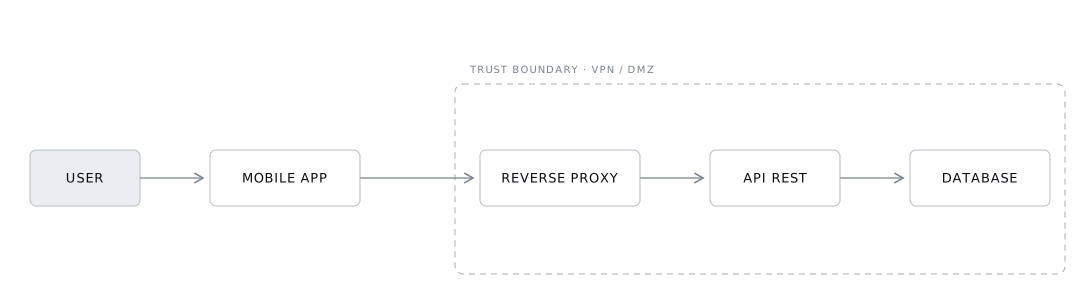
The first artifact is the data flow diagram: where data enters, transits and sits at rest. The team draws it, with whatever tool the team already uses. Excalidraw, draw.io, Miro or MermaidJS, it does not matter. Session time is for modeling threats, not for learning a new tool.
Two practical rules:
- Focus on the main flows. You could detail every endpoint, but in an express approach the goal is to capture the most critical flows.
- Restrict the scope to what the team can change. Mapping processes outside the team’s direct control produces threats with no owner.
3. Critical assets
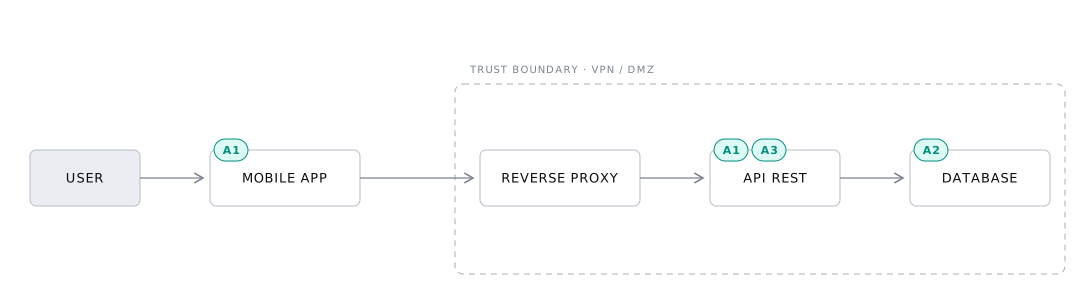
With the flow drawn, the team marks what needs extra protection. The question is simple: if this leaks or gets tampered with, how big is the damage? The list should stay short, holding only what truly demands a specific control.
In a typical system, the assets that show up first:
- A1 · Session token. The user’s authentication and authorization mechanism. Whoever obtains the token acts as the user without restriction.
- A2 · Personal data. Names, government IDs, sensitive data. A common attack target and a legal obligation to protect.
- A3 · Database credentials. Exposure compromises the integrity and confidentiality of everything stored.
Note where each asset sits at rest on the diagram. If there is time, mark the transit points as well.
4. Threat actors
Now the team puts on the attacker’s hat. Before listing threats, it pays to define who attacks, because each actor has different motivations and capabilities, and that changes which threats make sense for your product:
- Cybercriminals: financial gain, ransomware, phishing.
- State-sponsored actors: espionage and sabotage.
- Hacktivists: social or political causes.
- The curious: attack for fun or learning, and cause damage anyway.
- Insiders: privileged access, intentional or accidental.
And then there are the actors that only surface when the team knows its own product. In Brazil, reality show fans organizing voting raids are a real threat actor: open TV voting systems process nearly 3 million votes per minute at peak. No generic framework would have listed that actor. The team did. On thinking about non-standard actors, see this talk from OWASP Global AppSec 2023.
5. Threats
With the actors defined, the team walks the data flow asking: where would this actor attack these assets? Each threat is recorded with a note on how it was identified, because that note is what lets you re-evaluate the threat when the architecture changes.
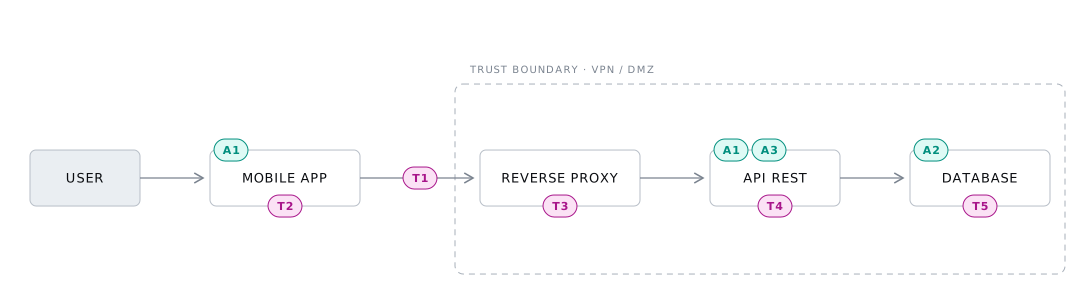
In our example, five threats came out of the analysis:
- T1 · Interception of sensitive data. Identified while analyzing the flow between client and server. Credentials and personal data in transit can be intercepted, especially if the communication is not encrypted end to end, compromising data privacy and integrity.
- T2 · Session token exposure. The token is the authentication mechanism, so any flaw that allows unauthorized access to it results in session hijacking: the attacker acts in the system as the user. It surfaced when thinking about insecure storage on the device and transmission over vulnerable channels.
- T3 · Service unavailability. Availability is a security pillar too. Denial-of-service attacks or resource exhaustion make the system inaccessible, and the impact on user experience and trust is immediate, whether the attack is intentional or a technical failure.
- T4 · Credential exposure. Misconfiguration or inadequate protection of database and critical service credentials gives the attacker direct access to the data. Beyond its own damage, this threat works as an entry point for further attacks.
- T5 · Unauthorized access to personal data. It came from the question “who can reach personal data without permission?”. Access control failures or exploitable vulnerabilities lead to privacy violations, legal consequences and loss of trust.
Notice that every threat points to an asset from the previous step and to a concrete spot in the flow. A generic threat (“we could get hacked”) never becomes a control; a threat anchored in the diagram does.
6. Controls
For each threat, the team defines technical or procedural controls. Document the ones that already exist too: that is what gives a complete view of the defense and lets you verify later whether a control is still active and effective.
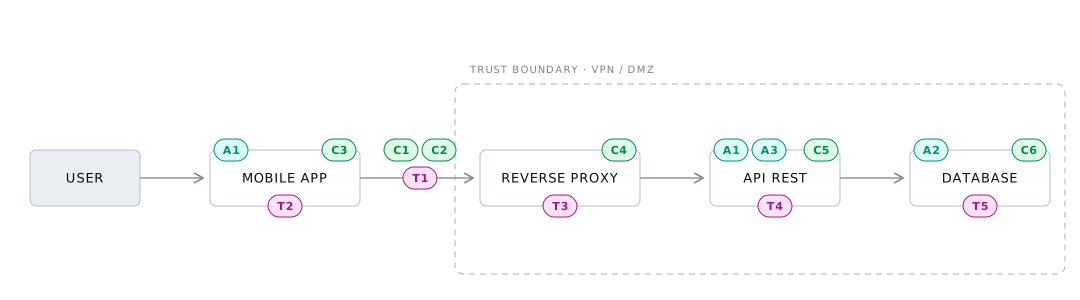
Examples of what comes out of this step:
- C1 · TLS pinning. Against man-in-the-middle interception: the application only accepts specific, valid certificates.
- C2 · Encryption of sensitive data in transit. So intercepted data is unreadable and therefore useless.
- C3 · Secure token storage. Keychain on iOS, Keystore on Android: encrypted areas that make unauthorized access difficult.
- C4 · Rate limiting. Caps requests per IP or origin to sustain availability and detect anomalous access.
- C5 · Secrets management. AWS Secrets Manager or HashiCorp Vault for credentials, with rotation and access monitoring.
- C6 · Granular access controls. Least privilege: each user or process reaches only what is strictly necessary.
Each control becomes a task with an owner in the backlog. Without that, the workshop produces a pretty diagram and nothing changes.
What remains after the workshop
The data flow is the most visible artifact, but the real value is in the threat and control annotations. They are the product’s security memory: they anticipate risks in upcoming features and record which defense protects what. Reviewed at every relevant architecture change, they keep security evolving along with the system.
To measure whether the practice is working, track threats identified and mitigated per cycle. In agile teams, the recommendation is to model in small increments, following each new feature, with depth adjusted to the team’s maturity.
The real challenge is usually cultural, not technical. Security champions programs, hands-on sessions and a posture of facilitating instead of policing help turn threat modeling into a team habit rather than a quarterly audit.
Closing
Threat modeling is one of the few security practices that improves communication between engineering and business instead of creating friction. The earlier it enters the development cycle, the cheaper every avoided risk becomes.
This is exactly the format we run in eFlag’s Threat Modeling workshops, including flows with LLMs and agents. If you want to see the method applied to your product, talk to us.
This article is a revised version of the guide published by our founder, Fernando Guisso, which also includes the talk slides and a mini game to practice.